


How do payouts work on PromptBase?
When and how PromptBase pays you for your sales: payout schedules, minimum balances, early payouts, currency conversion and supported countries.
Updated November 14, 2026
How do I get paid?
On PromptBase, you can receive payouts via Zoneless or Stripe. You choose one when you list your first prompt, and it has to be fully set up before we review your prompts.
Stripe pays into a bank account or debit card. Zoneless pays in USDC, a digital dollar, to a crypto wallet, and is available in more countries.
For Zoneless (USDC), payouts occur daily at 12:00 UTC with no minimum balance requirements.
For Stripe, payouts occur when the following conditions are met:
- Your account is at least 30 days old.
- You have reached a minimum available balance of $30.00 USD.
- It is the 1st of the month at 12:00 UTC if you are on a monthly payout schedule, or it is Monday at 12:00 UTC if you are on a weekly payout schedule.
If you're using Stripe, you can also start an early payout to be paid sooner, or below the minimum threshold.
You can see your balance, payouts, schedule and minimum threshold on the payouts tab of your account page. We can't set a custom threshold for you or hold your payouts back.
How do Zoneless payouts work?
Zoneless sends your earnings as USDC on the Solana network, to a wallet address you give during setup. We recommend a wallet you control, such as Phantom. An exchange account such as Coinbase also works, as long as you give its Solana address for USDC. If the address isn't a valid Solana address, the payout can't be sent.
Payouts are sent every day with no minimum balance, and PromptBase charges no fee for them. Turning USDC into your local currency is done through your wallet or exchange, and isn't something we can advise on.
Zoneless asks you to verify your identity before it pays out. See the next section.
My Zoneless payouts are paused pending KYC
KYC is the identity check Zoneless runs before it pays you. Until you pass it your payouts are paused, your prompts show Enable Payouts, and they aren't reviewed or on sale. You may be asked for it during setup, or again later.
- Open the payouts tab of your account page and reload it.
- Click Complete KYC in Zoneless Dashboard.
- In the Zoneless dashboard, click View Task in the banner and follow the steps. You'll need a photo ID and a selfie.
Checks that fail usually fail for one of these reasons, all of which you can fix on the settings page of your Zoneless dashboard before trying again:
- The name isn't your legal name as shown on your ID. A store name or nickname is rejected.
- The name isn't written in Latin letters (A-Z).
- The phone number or postal code is missing or invalid.
- The photos are blurred or badly lit.
Some checks need a manual review, which can take a few days. Your payouts and prompts are re-enabled automatically once you pass.
How do I change my bank account, wallet or payout method?
Your payout details are held by Stripe or Zoneless, not by PromptBase, so we can't edit them for you.
- Stripe: change your bank account, name or phone number in your Stripe Express dashboard, which you can open from the payouts tab.
- Zoneless: change your wallet address or personal details in the settings of your Zoneless dashboard.
- Switching method: choose the other payout method on the payouts tab and complete its setup. Money already sent to your Stripe account is still paid to your bank, and can't be moved to a wallet.
- A new Stripe account: to connect Stripe under a different email, delete your Stripe account from the Danger Zone of your account settings, then connect again. This doesn't delete your PromptBase account.
How are funds added to my balance?
Whenever you make a sale on the PromptBase marketplace, PromptBase takes a 20% application fee, and the remaining 80% is added to your pending balance. After 72 hours it moves over to your available balance.
For example, if you sell a prompt for $10.00, then $8.00 is added to your pending balance. 72 hours later, that $8.00 moves to your available balance.

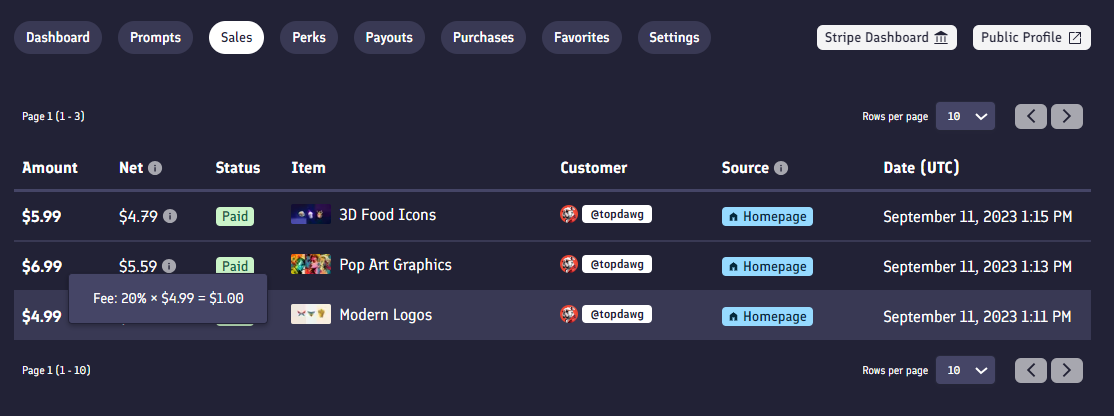
You can see the amount added to your balance in the Net revenue column on the sales tab of your account page. An hourglass icon appears next to the amount while it is still pending.
I made a sale, but I haven't been paid
A sale isn't paid out straight away. It spends 72 hours in your pending balance, then waits for your next scheduled payout. With Stripe it also waits for your balance to reach the minimum threshold, and for your account to be 30 days old.
If your balance isn't moving at all, check the payouts tab of your account page for a message asking you to finish setting up or verify your identity. The same tab shows the status of every payout, as does your Stripe or Zoneless dashboard.
If a sale has been pending for more than a week, contact us.
Early payouts
If you're using Stripe, you can start an early payout to pay out your balance even if it is below the minimum threshold, or it isn't the right day of your payout cycle.
An early payout has a $3.99 USD fee. If there is more than $10.00 USD in your PromptBase balance we subtract the fee from your balance, otherwise the fee is taken by card payment.
You can start an early payout when:
- There is more than $3.99 USD in your balance.
- Your account is at least 30 days old.
An early payout takes 7 days to process.
Why does PromptBase charge an early payout fee?
The fee covers the average cost that Stripe charges PromptBase for sending a payout: a flat fee, plus a percentage of the payout, plus currency conversion fees. It is a pass-through fee that PromptBase does not profit from. If your payout is made on your regular schedule with your balance above the minimum threshold, we waive it.
Currency conversion
When you sign up with Stripe, you choose a bank account to receive payouts into. We send your earnings in USD to your Stripe account, and Stripe converts them into your bank's currency before paying out.
For example, if you have $100.00 USD in your PromptBase balance and your bank account is in euros, we send $100.00 to your Stripe account. Stripe converts it at a mid-market rate (say 1 USD = 0.93 EUR), and €93.00 is deposited in your bank account.
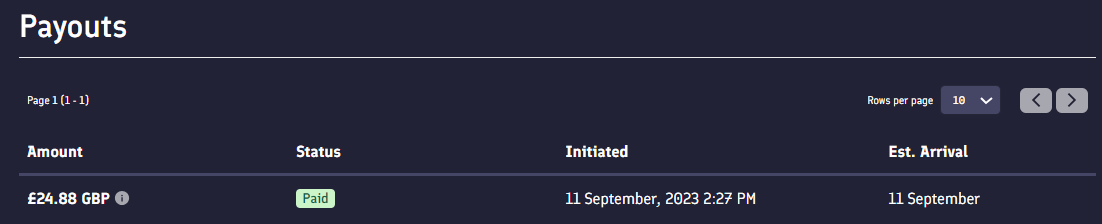
To see the exchange rate used for a payout, hover over the information icon next to the payout amount on the payouts tab of your account page.
Stripe fund settlement time delay
For some countries, when we transfer funds from your PromptBase balance to your Stripe account, Stripe can take several days to let the funds settle before they can be paid out to your bank. If this happens, a blue message appears on your payouts page:

This is quite normal for payouts with Stripe, so don't worry. PromptBase checks every 24 hours to see if the funds have become available, then starts the payout to your bank. It can take 3-5 days from the first transfer to your Stripe account.
How long does a payout take to reach my bank?
Once Stripe has started a payout, it can take 3-4 business days for the money to arrive in your bank account. This varies with where you are and whether there's a national holiday.
You can see every payout, its status and its estimated arrival date on the payouts tab of your account page, or in your Stripe Express dashboard.
My payout failed, or went to a closed bank account
We can't recall a payout once it has been sent. If your bank rejects it, the money is returned to your Stripe account. Update your bank details in your Stripe dashboard, and the payout is sent again.
Stripe is asking for more information, what do I do?
Stripe will sometimes ask you for extra information, such as an identification document, to finish setting up your account. You can provide it from your Stripe Express dashboard.
For this, or any question about your connected bank account, Stripe can help you directly. Use their 24/7 live chat by clicking Contact Stripe Express Support on support.stripe.com/express.
My country isn't appearing when I try to sell
When you set up payouts you choose your country of residence, and we show which payout methods work there.
- If Stripe isn't supported in your country, you'll usually be offered Zoneless instead. This is the case for Brazil, Georgia, Lebanon, Nepal and Ukraine, among others.
- If your country isn't in the list, or neither method is available for it, as with Russia, we can't pay sellers there yet. The same list applies to Stripe and Zoneless.
Your seller account, your ID and your payout details must all be your own, and must match the country you live in. You can't choose a different country, use a bank account in another country, or use the details of a friend, relative or company elsewhere.
For what Stripe needs in your country, such as which documents and bank accounts it accepts, start the Stripe setup or ask Stripe Express support. We don't set those requirements and can't see them.
Regular Stripe isn't available in my country, can I still sign up?
Often, yes. To sell on PromptBase you create a Stripe Express account with us, which is a smaller version of Stripe and is different from a regular Stripe account. You create it when you upload your first prompt, and you don't need a Stripe account beforehand.
Stripe Express isn't a way around the country list. If the payout setup says Stripe isn't supported for your country, use Zoneless if it's offered.
My sale is flagged as fraudulent, what does this mean?
It means the payment for that sale was flagged as fraudulent and refunded. It has nothing to do with your prompt or an unhappy customer, and it is rare.
Legacy payouts
Before September 12th 2023, funds from sales built up in your Stripe balance and were paid out automatically after a certain period of time, whatever the amount.
Any funds paid into your Stripe balance before that date, and held there for longer than 2 years in the USA or 90 days everywhere else, will trigger a payout of your total available balance.