


Prompt Details
Model
(claude-5-sonnet)
Token size
1,948
Example input
[HTML_SOURCE]: <form action="/checkout" method="post"> <h2>Payment details</h2> <input type="text" name="card" placeholder="Card number"> <input type="text" name="cvv" placeholder="CVV"> <span style="color:red">* Required fields are marked in red</span> <div class="btn" onclick="pay()">Pay now</div> <img src="secure-badge.png"> </form>
[CONFORMANCE_LEVEL]: AA
[CSS_STYLES]: .btn { background:#0057b8; color:#7aa7d9; } span { color:#e00; }
[AUDIT_CONTEXT]: pre-launch
Example output
===========================================================
WEB ACCESSIBILITY AUDIT — WCAG 2.1/2.2 AA
===========================================================
Scope: HTML fragment (checkout payment form) — not a full page; no `<html>`, `<head>`, or `<title>` supplied, so page-level checks are marked N/A rather than failed
Context: pre-launch
EXECUTIVE VERDICT
Score: 38/100
Level A: FAIL — 5 criteria failed
Level AA: FAIL — 6 criteria failed
Critical 3 | Serious 2 | Moderate 1 | Minor 0
Verdict: A screen-reader or keyboard-only user cannot submit payment at all, because the "Pay now" control is a non-interactive `<div>` with no keyboard access and no exposed name/role.
STRUCTURAL INVENTORY
| Item | Finding |
|---|---|
| Heading outline | Single `<h2>Payment details</h2>`; no `<h1>` present in fragment — cannot confirm if this skips a level without the parent page |
| Landmark regions | None present (no header/nav/main/footer/aside) — form is not wrapped in a landmark |
| Interactive elements | 2 text inputs (card, cvv), 1 fake button (`div.btn`), 0 real `<button>`/`<a>` |
| lang attribute | N/A — fragment has no `<html>` tag |
| Images | 1 `<img src="secure-badge.png">`, no `alt` attribute (missing, not empty) |
| Form inputs | 2 of 2 inputs have no programmatic label (`placeholder` only) |
FINDING CARDS — grouped by POUR, CRITICAL first within each group
-----------------------------------------------------------
CRITICAL — WCAG 2.1.1 Keyboard
Element: `<div class="btn" onclick="pay()">Pay now</div>`
Issue: A `<div>` is used as the submit control with only an `onclick` handler. Divs are not natively focusable or activatable from a keyboard.
Impact: Keyboard-only users cannot Tab to or activate this control — they cannot complete payment at all.
Fix:
- `<div class="btn" onclick="pay()">Pay now</div>`
+ `<button type="submit" class="btn">Pay now</button>`
-----------------------------------------------------------
CRITICAL — WCAG 4.1.2 Name, Role, Value
Element: `<div class="btn" onclick="pay()">Pay now</div>`
Issue: The control exposes no role (e.g. `button`) and no programmatic name/state to assistive technology — a screen reader announces it as plain text, not as an actionable control.
Impact: Screen reader users won't know a "Pay now" action exists on the page.
Fix:
- `<div class="btn" onclick="pay()">Pay now</div>`
+ `<button type="submit" class="btn">Pay now</button>`
-----------------------------------------------------------
CRITICAL — WCAG 3.3.2 Labels or Instructions
Element: `<input type="text" name="card" placeholder="Card number">`, `<input type="text" name="cvv" placeholder="CVV">`
Issue: Both fields rely on `placeholder` as their only label. Placeholder text is not a programmatic label, disappears once the user types, and is not reliably announced by all assistive technology.
Impact: Screen reader and voice-control users may not know what a field is for, especially after entering a value — a serious problem on a card/CVV form where mis-entry has real consequences.
Fix:
- `<input type="text" name="card" placeholder="Card number">`
+ `<label for="card">Card number</label>`
+ `<input type="text" id="card" name="card" placeholder="Card number">`
-----------------------------------------------------------
SERIOUS — WCAG 1.1.1 Non-text Content
Element: `<img src="secure-badge.png">`
Issue: No `alt` attribute at all (not even `alt=""`). The image appears to be a meaningful trust/security indicator, not decorative.
Impact: Screen reader users get no information about the badge and may miss a trust signal relevant to entering payment data.
Fix:
- `<img src="secure-badge.png">`
+ `<img src="secure-badge.png" alt="Secure checkout — SSL encrypted">`
-----------------------------------------------------------
SERIOUS — WCAG 1.4.3 Contrast (Minimum)
Element: `.btn { background:#0057b8; color:#7aa7d9; }` ("Pay now" text)
Issue: Computed contrast between `#7aa7d9` text and `#0057b8` background is approximately 2.7:1, below the 4.5:1 minimum for normal text (and below 3:1 even if this were treated as large text).
Impact: Low-vision users may struggle to read the "Pay now" label — on the single control that submits payment, this is a poor place for low contrast.
Fix:
- `.btn { background:#0057b8; color:#7aa7d9; }`
+ `.btn { background:#0057b8; color:#ffffff; }`
-----------------------------------------------------------
MODERATE — WCAG 1.4.1 Use of Color
Element: `<span style="color:red">* Required fields are marked in red</span>` with `span { color:#e00; }`
Issue: Required-field status is communicated only via a color-based instruction ("marked in red"), and neither `<input>` actually carries a visible red marker or a `required` attribute — the instruction points to a visual cue that isn't present on the fields themselves.
Impact: Color-blind users can't rely on the color cue, and no user — regardless of vision — can currently identify which fields are required from the markup alone.
Fix:
- `<span style="color:red">* Required fields are marked in red</span>`
+ `<span>Fields marked with <abbr title="required">*</abbr> are required</span>` on each required `<label>`, plus `required` and `aria-required="true"` on each `<input>`
-----------------------------------------------------------
REMEDIATION ORDER
1. Replace `div.btn` with a real `<button type="submit">` (fixes 2.1.1 and 4.1.2 in one change — restores the ability to pay at all for keyboard/AT users)
2. Add `<label>` elements tied to `card` and `cvv` inputs via `for`/`id` (3.3.2)
3. Add `alt` text to the security badge image (1.1.1)
4. Fix the "Pay now" text/background contrast to meet 4.5:1 (1.4.3)
5. Tie required-field indication to the actual fields with text + `required`/`aria-required`, not color alone (1.4.1)
NOT COVERED BY THIS AUDIT
- Real screen-reader announcement (NVDA, JAWS, VoiceOver)
- Dynamic focus management in JS-driven interactions (e.g. what happens on submit/validation error, since `pay()` isn't provided)
- Touch target sizing on physical devices
- Captions and media alternatives
- Page-level checks (page `<title>`, `lang`, landmarks) — this was a fragment, not a full document
Recommended next step: automated pass with axe-core or WAVE, plus one manual screen-reader walkthrough before sign-off.
DISCLAIMER
Structural, code-level review of the markup supplied. Not a legal certification of ADA, Section 508, or EN 301 549 conformance. Full conformance requires automated tooling and assistive-technology testing not performed here.
===========================================================


 Instant access
 Commercial use
 Money‑back
By purchasing this prompt, you agree to our terms of service
5.0
2 reviews
1
Favorites
148
Views
CLAUDE-5-SONNET


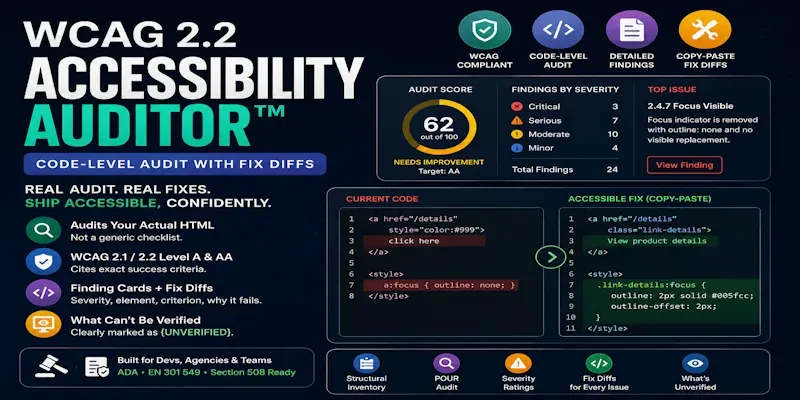
This prompt parses your actual markup against WCAG 2.1/2.2 Level A and AA, then returns a scored verdict, a Finding Card for every violation (severity, exact element, the specific success criterion, why it fails), and a copy-paste code diff for each fix.
...more
Added over 1 month ago

- Reviews for this prompt (2)