

Prompt Details
Model
Chat - (gpt-5.6)
Token size
1,042
Example input
[Sea Turtles Are Us]: Resin Reef
[Messenger Pigeons Only]: Simulated Shopify Network
[Two houses; the pigeon sends messages back and forth]: Simulated Shopify Endpoint
[Simulated messenger pigeon door to door network]: Simulated shopify identity accounts and cloud services
[reliable messenger pigeon, secure envelopes, destruction methods, encrypted messaging]: simulated date and security requirements
Example output
# Zero Trust Cybersecurity Audit
**Organization:** Resin Reef
**Environment:** Simulated Shopify Small-Business Environment
**Assessment Type:** Small-Business Cybersecurity & Zero Trust Security Review
**Framework References:** NIST CSF 2.0, NIST SP 800-207 Zero Trust Architecture, CISA Cybersecurity Performance Goals, CISA Zero Trust principles, and generally accepted small-business cybersecurity practices.
> **Assessment limitation:** This audit is based only on the simulated information supplied. Where a security control cannot be verified, it is marked **UNKNOWN** rather than assumed to be secure or insecure.
## 1. Executive Security Summary
Resin Reef is modeled as a small business using Shopify and associated cloud services to support e-commerce operations.
Because the supplied environment information is intentionally simulated and does not specify actual configurations, the current cybersecurity posture **cannot be fully verified**. Important information is missing regarding network configuration, administrator protections, MFA, endpoint security, backups, logging, recovery procedures, and incident-response capabilities.
The most important first step is therefore **verification of controls**, rather than assuming vulnerabilities exist.
From a Zero Trust perspective, Resin Reef should operate according to three fundamental concepts:
1. **Verify explicitly** — authenticate and authorize users and devices based on available security signals.
2. **Use least-privilege access** — users and applications should receive only the permissions necessary to perform their functions.
3. **Assume breach** — design systems so that compromise of one account, endpoint, or service does not automatically expose the entire business environment.
For a Shopify-based small business, particular attention should be given to administrator accounts, MFA, third-party applications, email security, endpoints used to administer the store, customer/business data, backups or exports of business-critical information, and monitoring of suspicious account activity.
---
# 2. Network & Perimeter Security
| Security Control | Status | Assessment |
| ------------------------- | ----------- | ------------------------------------------------------------------------------------------------------------------------- |
| Router/firewall security | **UNKNOWN** | Router/firewall configuration was not provided. |
| Default credentials | **UNKNOWN** | Verify all default router, firewall, access-point, printer, and IoT credentials have been changed. |
| Firmware | **UNKNOWN** | Confirm network devices run currently supported firmware. |
| Firewall rules | **UNKNOWN** | Review inbound and outbound rules and remove unnecessary access. |
| UPnP | **UNKNOWN** | Verify whether UPnP is enabled. Disable unless specifically required. |
| Port forwarding | **UNKNOWN** | Review router/firewall for unnecessary forwarded ports. |
| Remote administration | **UNKNOWN** | Internet-facing router administration should normally be disabled unless securely required. |
| VPN | **UNKNOWN** | No VPN configuration was supplied. A VPN may be appropriate where secure remote access to internal resources is required. |
| Wi-Fi security | **UNKNOWN** | Verify WPA2-AES or preferably WPA3 where supported. |
| Guest network | **UNKNOWN** | Guest and untrusted devices should be isolated from business systems. |
| VLAN/network segmentation | **UNKNOWN** | Consider separating trusted business devices, guest devices, and IoT equipment. |
| DNS/security filtering | **UNKNOWN** | Consider protective DNS or equivalent malicious-domain filtering. |
| Network logging | **UNKNOWN** | Determine whether firewall/router security events are retained and reviewed. |
### Network Recommendation
For a very small business, complicated enterprise segmentation may not be necessary. A practical architecture could separate:
**Business Devices → Guest Devices → IoT/Printers**
The business network should contain only trusted devices used for business operations.
---
# 3. Identity & Zero Trust Access
| Security Control | Status | Assessment |
| ---------------------- | ----------- | ------------------------------------------------------------------------------------------------------------- |
| MFA/2FA | **UNKNOWN** | Verify MFA on Shopify and all business-critical accounts. |
| Administrator accounts | **UNKNOWN** | Determine who has administrative access and whether every administrator requires that level of privilege. |
| Least privilege | **UNKNOWN** | Assign the minimum permissions required for each user. |
| Password management | **UNKNOWN** | Use unique passwords stored in a reputable password manager. |
| Remote access | **UNKNOWN** | Identify any remote access to business systems and verify strong authentication. |
| Account lifecycle | **UNKNOWN** | Establish procedures to create, modify, disable, and remove accounts. |
| Cloud identities | **UNKNOWN** | Inventory Shopify, email, domain/DNS, payment, social media, accounting, storage, and other cloud identities. |
| Privileged access | **UNKNOWN** | Privileged accounts require additional protection and monitoring. |
### Zero Trust Recommendations
Resin Reef should not automatically trust a user merely because the correct password was entered.
For high-value accounts, access decisions should ideally consider:
* Identity
* MFA
* Account privilege
* Device security
* Location or unusual-login indicators
* Session behavior
* Sensitivity of the requested resource
Priority accounts include the Shopify owner/admin account, business email, domain registrar/DNS provider, payment accounts, financial services, cloud storage, and other systems capable of changing the business's online presence.
---
# 4. Devices & Endpoint Security
| Security Control | Status | Assessment |
| ------------------------------ | ---------------------------- | ----------------------------------------------------------------------------------------------------------------------------------- |
| Supported operating systems | **UNKNOWN** | Inventory operating systems and verify vendor support. |
| Automatic updates | **UNKNOWN** | Enable automatic security updates where practical. |
| Patch verification | **UNKNOWN** | Periodically verify devices are actually receiving updates. |
| Endpoint protection/EDR | **UNKNOWN** | Confirm appropriate endpoint protection is enabled and functioning. |
| Host firewall | **UNKNOWN** | Verify built-in or managed host firewalls are enabled. |
| Disk encryption | **UNKNOWN** | Enable full-disk encryption on laptops and portable business devices. |
| Local administrator privileges | **UNKNOWN** | Avoid routine business activity from administrator accounts. |
| Mobile devices | **UNKNOWN** | Devices accessing administrative systems should use screen locks, encryption, updates, and remote-loss protections where available. |
| Servers/NAS | **NOT APPLICABLE / UNKNOWN** | No server or NAS was specified. Confirm during discovery. |
| IoT/printers | **UNKNOWN** | Inventory and isolate where practical. |
| Unsupported hardware/software | **UNKNOWN** | Identify and replace unsupported systems. |
### Endpoint Priority
Devices used to administer Shopify or business email should receive the strongest protection because compromise of one of these devices could lead to credential theft or account takeover.
---
# 5. Data, Backup & Recovery
| Security Control | Status | Assessment |
| --------------------------------- | ----------- | -------------------------------------------------------------------------------------------------- |
| Sensitive-data identification | **UNKNOWN** | Identify what customer, financial, employee, vendor, and proprietary data the business stores. |
| Encryption | **UNKNOWN** | Verify sensitive data is appropriately protected in transit and at rest where applicable. |
| Backup strategy | **UNKNOWN** | No backup strategy was supplied. |
| Offline/isolated/immutable backup | **UNKNOWN** | Determine whether critical business data requires independently protected backups. |
| Backup monitoring | **UNKNOWN** | Backup success should be monitored rather than assumed. |
| Restore testing | **UNKNOWN** | Periodically test recovery of critical data. |
| Cloud-data protection | **UNKNOWN** | Determine what Shopify and other providers protect and what remains the business's responsibility. |
| Recovery procedures | **UNKNOWN** | Document procedures for recovering accounts, data, websites, and business operations. |
### Recommended Backup Principle
For business-critical information outside the primary SaaS platform, consider a **3-2-1-oriented strategy** where appropriate:
* Maintain multiple copies of important data.
* Use more than one storage method or location.
* Maintain at least one copy sufficiently isolated from the primary environment.
The exact implementation should reflect Resin Reef's actual data and recovery requirements.
---
# 6. Monitoring & Incident Readiness
| Security Control | Status | Assessment |
| ----------------------------- | ----------- | ------------------------------------------------------------------------------------------------------------------------ |
| Security logging | **UNKNOWN** | Determine what security events are available from Shopify, email, endpoints, network devices, and other cloud platforms. |
| Security alerts | **UNKNOWN** | Enable useful security notifications where supported. |
| Suspicious-login monitoring | **UNKNOWN** | Monitor unusual authentication and administrative activity. |
| Vulnerability management | **UNKNOWN** | Establish periodic review of devices, applications, plugins/apps, and exposed services. |
| Incident-response procedures | **UNKNOWN** | Create a short incident-response plan. |
| Employee reporting procedures | **UNKNOWN** | Define how suspicious emails, logins, or device behavior should be reported. |
| Security awareness | **UNKNOWN** | Provide periodic phishing, password, MFA, and social-engineering awareness training. |
### Minimum Incident-Response Procedure
Resin Reef should document what to do when:
* A Shopify account may be compromised.
* Business email is compromised.
* A laptop or mobile device is lost.
* Malware is detected.
* Customer/business information may have been exposed.
* Unauthorized transactions or configuration changes occur.
The plan should identify **who takes action, what gets isolated, which credentials are reset, which logs are preserved, which providers are contacted, and how recovery occurs.**
---
# 7. Top Five Risks
Because the environment has not been technically verified, these are primarily **control-verification risks**, not confirmed vulnerabilities.
### Risk 1 — Unverified MFA on Critical Accounts
**Severity:** High
**Why It Matters:**
Compromise of Shopify, business email, domain/DNS, payment, or other privileged cloud accounts could allow an attacker to modify the storefront, intercept communications, access business information, or perform fraudulent activity.
**Recommended Action:**
Verify MFA on every critical business account, beginning with administrative and recovery accounts. Prefer phishing-resistant authentication methods where available.
**Relevant NIST/CISA Area:**
NIST CSF Protect; NIST SP 800-207 identity-centric access; CISA identity and access-management practices.
---
### Risk 2 — Unknown Endpoint Security Posture
**Severity:** High
**Why It Matters:**
A compromised computer used to administer Shopify could expose credentials or authenticated sessions even when the cloud platform itself is secure.
**Recommended Action:**
Verify operating-system support, updates, endpoint protection, host firewall, encryption, browser security, and local administrator privileges.
**Relevant NIST/CISA Area:**
NIST CSF Protect/Detect; CISA device-security practices.
---
### Risk 3 — Unknown Backup and Recovery Capability
**Severity:** High
**Why It Matters:**
Account compromise, accidental deletion, ransomware, service disruption, or human error could interrupt operations or cause loss of business-critical information.
**Recommended Action:**
Identify critical information and establish documented backup and recovery procedures appropriate to each system.
**Relevant NIST/CISA Area:**
NIST CSF Recover; CISA backup and recovery practices.
---
### Risk 4 — Unverified Third-Party and Cloud Access
**Severity:** Medium–High
**Why It Matters:**
Shopify applications and other connected cloud services can introduce additional identities, permissions, integrations, and data-access paths.
**Recommended Action:**
Inventory connected applications and integrations. Remove unused services and review permissions regularly.
**Relevant NIST/CISA Area:**
NIST CSF Govern/Identify/Protect; Zero Trust least privilege.
---
### Risk 5 — Unknown Monitoring and Incident Response
**Severity:** Medium–High
**Why It Matters:**
Without monitoring and a response procedure, unauthorized access may remain unnoticed and response actions may be delayed.
**Recommended Action:**
Enable relevant security alerts and create a concise incident-response checklist containing contacts, containment procedures, credential-reset procedures, evidence-preservation steps, and recovery actions.
**Relevant NIST/CISA Area:**
NIST CSF Detect, Respond, and Recover; CISA incident-response practices.
---
# 8. Prioritized Remediation Plan
## IMMEDIATE — 0–24 Hours
1. Verify MFA on Shopify owner/admin accounts.
2. Verify MFA on business email.
3. Verify MFA on domain registrar/DNS accounts.
4. Verify MFA on payment and financial administration accounts.
5. Review Shopify administrator/user accounts for unknown or unnecessary access.
6. Review account-recovery email addresses and phone numbers.
7. Verify computers used for administration are updated and protected.
8. Investigate any currently known suspicious login or security alerts.
## HIGH PRIORITY — Within 7 Days
1. Inventory business accounts and cloud services.
2. Inventory devices accessing business systems.
3. Review Shopify applications and integrations.
4. Remove unused user accounts and applications.
5. Review router/firewall configuration.
6. Change any remaining default device credentials.
7. Verify Wi-Fi encryption and router firmware.
8. Disable unnecessary UPnP, remote administration, and port forwarding.
9. Implement a reputable password manager.
10. Establish initial backup and recovery procedures.
## MEDIUM PRIORITY — Within 30 Days
1. Separate guest/IoT traffic from trusted business devices where practical.
2. Verify full-disk encryption on laptops.
3. Establish routine patch verification.
4. Document an incident-response procedure.
5. Configure security alerts.
6. Establish vulnerability and application reviews.
7. Test restoration of critical business data.
8. Document account creation and termination procedures.
9. Review privileged access according to least privilege.
10. Conduct basic phishing/security-awareness training.
## ONGOING — Monthly/Quarterly
**Monthly:**
* Review administrative accounts.
* Review security alerts.
* Verify endpoint updates.
* Review important third-party applications.
* Verify backups completed successfully.
**Quarterly:**
* Test restoration of critical data.
* Review user privileges.
* Review network configuration.
* Review business cloud-service inventory.
* Remove unused accounts/apps.
* Review incident-response procedures.
* Conduct a security-awareness refresher.
---
# 9. Final Cybersecurity Audit Score
Because virtually all technical controls are currently **unverified**, assigning high or low scores would create false precision.
The following scores therefore measure **verified security posture based on supplied evidence**, not necessarily the security of the actual Shopify platform or Resin Reef environment.
| Category | Score |
| ------------------------------- | ---------: |
| Network Security | **20/100** |
| Identity & Access Security | **20/100** |
| Endpoint Security | **20/100** |
| Data Protection & Recovery | **20/100** |
| Monitoring & Incident Readiness | **20/100** |
## Cybersecurity Security Posture Score: **20/100 — Insufficient Evidence / Baseline Assessment**
The score is intentionally conservative because most controls are **UNKNOWN**, not because they have been demonstrated to be insecure.
A verified control can increase the score. A confirmed weakness can reduce it. This approach prevents an organization from receiving security credit for controls that have not actually been examined.
### Suggested Scoring Method
For future audits, each applicable control can be scored as:
* **PASS = 100% control credit**
* **REVIEW = 50% control credit**
* **FAIL = 0% control credit**
* **UNKNOWN = 0% verified-control credit**
* **NOT APPLICABLE = excluded from calculation**
This creates a repeatable assessment methodology and encourages evidence-based auditing.
> **Important:** This is an internal cybersecurity assessment score. It is **not an official NIST, CISA, CMMC, government, regulatory, or third-party certification**, and framework alignment does not establish formal compliance.
---
# 10. Technician Checklist
## Network
* [ ] Identify router/firewall make and model
* [ ] Verify firmware version and vendor support
* [ ] Verify default credentials were changed
* [ ] Review firewall rules
* [ ] Review open ports
* [ ] Review port forwarding
* [ ] Check UPnP configuration
* [ ] Check remote-administration settings
* [ ] Verify Wi-Fi security
* [ ] Review guest network
* [ ] Review VLAN/network segmentation
* [ ] Review DNS/security filtering
* [ ] Verify network logging
## Accounts
* [ ] Inventory business accounts
* [ ] Verify MFA on critical accounts
* [ ] Review Shopify administrators
* [ ] Review email administrators
* [ ] Review domain/DNS administrators
* [ ] Review payment/financial administrators
* [ ] Remove unused accounts
* [ ] Verify least privilege
* [ ] Review recovery accounts
* [ ] Verify password-management practices
## Devices
* [ ] Inventory computers
* [ ] Inventory mobile devices
* [ ] Verify supported operating systems
* [ ] Verify automatic updates
* [ ] Verify current patch status
* [ ] Verify endpoint protection
* [ ] Verify host firewall
* [ ] Verify disk encryption
* [ ] Review local administrator accounts
* [ ] Inventory printers/IoT
* [ ] Identify unsupported hardware/software
## Cloud
* [ ] Review Shopify security settings
* [ ] Inventory Shopify applications
* [ ] Remove unused integrations
* [ ] Review application permissions
* [ ] Review business email security
* [ ] Review DNS/domain security
* [ ] Inventory cloud-storage services
* [ ] Review privileged cloud identities
* [ ] Verify MFA on cloud administration accounts
## Data/Backups
* [ ] Identify critical business data
* [ ] Identify sensitive information
* [ ] Document where critical data is stored
* [ ] Verify encryption where appropriate
* [ ] Verify backup configuration
* [ ] Verify backup monitoring
* [ ] Verify isolated/offline backup where appropriate
* [ ] Perform test restoration
* [ ] Document recovery procedures
## Monitoring
* [ ] Review security logs
* [ ] Enable relevant security alerts
* [ ] Review suspicious-login notifications
* [ ] Establish vulnerability-review process
* [ ] Review endpoint security alerts
* [ ] Review administrative activity
* [ ] Establish periodic security reviews
## Documentation
* [ ] Maintain asset inventory
* [ ] Maintain account inventory
* [ ] Maintain cloud-service inventory
* [ ] Document administrator ownership
* [ ] Document incident-response procedure
* [ ] Document account onboarding/offboarding
* [ ] Document backup procedures
* [ ] Document recovery procedures
* [ ] Record remediation findings
* [ ] Record evidence supporting PASS/FAIL determinations
* [ ] Schedule next cybersecurity review
---
## Final Assessment
**Current Status: BASELINE / REQUIRES VERIFICATION**
The simulated Resin Reef environment does not provide enough evidence to declare individual cybersecurity controls secure or insecure. The highest-value next step is a structured technical verification of identity security, endpoints, network configuration, Shopify/cloud access, backups, and monitoring.
The audit should follow a Zero Trust principle throughout:
**Never grant trust merely because a user, device, or service is already inside the environment. Verify identity, device, access requirements, and privilege continuously and limit access to what is necessary.**
This assessment uses NIST and CISA guidance as reference frameworks. It does **not** represent certification, accreditation, regulatory approval, or a formal determination of compliance.



Get this prompt + 9 more with Select$14 your first month, then $19/mo$14 first month, then $19/mo
View Select
 Instant access
 Commercial use
 Money‑back
By purchasing this prompt, you agree to our terms of service
1
Favorites
22
Views
GPT-5.6


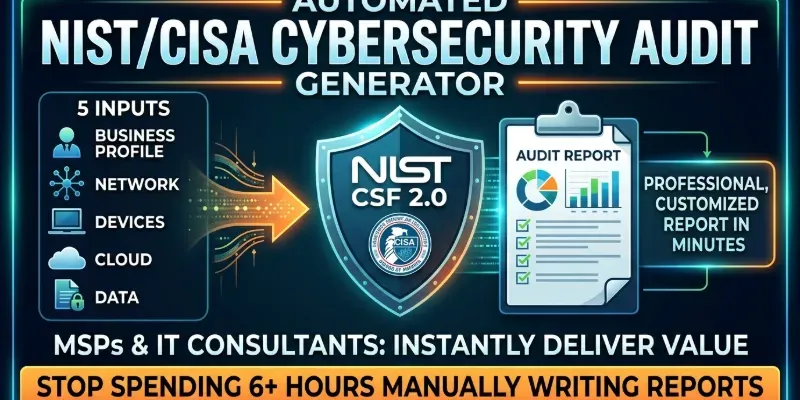
Turn just 5 simple inputs into a professional Zero Trust Cybersecurity Audit for small businesses, IT consultants, MSPs, and contractors.
This prompt analyzes your business profile, network infrastructure, devices, cloud accounts, and data-security requirements to generate a customized NIST CSF 2.0 & CISA-aligned cybersecurity assessment . The audit covers router and firewall security, UPnP, Wi-Fi, VPNs, MFA/2FA, admin accounts, endpoint protection, patching, encryption, network, etc.
...more
Added over 1 month ago
