

Skill Details
Runtime
(claude-4-7-opus)
Example user message
[userMessage]: create prompt template: Youtube Script Creator
Example agent response
I'll build this using the prompt-template-builder skill. Let me load it first.Load the prompt-template-builder skillLoad the prompt-template-builder skillBefore I build this, I need to confirm a few decisions with you.You said: Q: What kind of YouTube scripts should this template produce?Q: What kind of YouTube scripts should this template produce?
A: User picks per use via a variableQ: Which platform is this template for?
A: PromptBase (for sale)Q: Which elements should the script output include?
A: Full production (hook, body, CTA, visuals, thumbnail copy, title options)16:54Claude responded: Good — building a new PromptBase-ready template, format-flexible via variable, full production output.Good — building a new PromptBase-ready template, format-flexible via variable, full production output.
Candidate variables (max 5)
TOPIC — what the video is about (free text)
SCRIPT_FORMAT — enum: short (<60s), mid (3-6 min), long (8-15 min)
AUDIENCE — who is watching (free text)
TONE — enum: educational, entertaining, inspirational, analytical, casual
CHANNEL_ANGLE — the channel's POV / unique framing (free text)
Five variables, under the cap. Proceeding to build.
PROMPT TEMPLATE
mdINPUTS
TOPIC : [TOPIC]
SCRIPT_FORMAT : [SCRIPT_FORMAT]
AUDIENCE : [AUDIENCE]
TONE : [TONE]
CHANNEL_ANGLE : [CHANNEL_ANGLE]
You are a senior YouTube scriptwriter who has shipped 500+ scripts across faceless, talking-head, and creator-led channels. You write for retention, not for prose. You know how the algorithm rewards the first 30 seconds, how to break pattern every 20-40 seconds, and how to write CTAs that convert without breaking flow.
SCRIPT_FORMAT controls length and pacing. Accepted values: short, mid, long.
- short = 45 to 60 seconds of spoken content, single hook, no chapter breaks, payoff in final 5 seconds
- mid = 3 to 6 minutes, 3 to 5 content beats, mid-roll pattern interrupt at the 50 percent mark
- long = 8 to 15 minutes, 5 to 8 content beats with named chapters, two pattern interrupts, one mid-video CTA plus one end CTA
TONE controls voice and word choice. Accepted values: educational, entertaining, inspirational, analytical, casual. Apply the tone consistently across hook, body, and CTA.
Write a complete YouTube production package for a video about {{TOPIC}}, made for an audience of {{AUDIENCE}}, in {{SCRIPT_FORMAT}} format, with a {{TONE}} tone, framed through this channel's angle: {{CHANNEL_ANGLE}}.
OUTPUT RULES
- Deliver every section below in the order listed. Do not skip a section. Do not merge sections.
- Word counts are stated per section. Append the actual word count in parentheses at the end of each section that specifies one.
- Use plain text headings exactly as written below. No markdown, no emoji in headings.
- Spoken script lines are written as the talent would say them out loud — no stage directions inside the spoken lines themselves.
- B-roll and visual cues live in their own section, timestamped to the script.
- If {{SCRIPT_FORMAT}} is short, omit the CHAPTERS section and write only one CTA at the end of the script.
SECTION 1 — TITLE OPTIONS
Write 5 title options. Each title is 60 characters or fewer. Each one uses a different hook mechanism: curiosity gap, specific number, contrarian claim, named transformation, named enemy. Label each title with the mechanism it uses. After each title write the character count in parentheses.
SECTION 2 — THUMBNAIL COPY
Write 3 thumbnail text options. Each is 3 to 5 words. Each pairs with a visual concept described in one sentence. The visual concept names the subject, the expression or action, and the dominant color contrast. Do not name specific Pantone or hex values — describe the contrast in plain language, for example "high-contrast yellow on deep navy."
SECTION 3 — HOOK
Write the opening 15 seconds of spoken script. The hook must do three things in order: name the specific outcome the viewer gets, raise a stake or tension, and promise the payoff. No greeting. No channel intro. No "in this video." Word count: 35 to 50 words for short, 40 to 60 words for mid, 50 to 75 words for long.
SECTION 4 — CHAPTERS
Skip this section if {{SCRIPT_FORMAT}} is short. Otherwise list the chapters with timestamps. Mid format: 3 to 5 chapters. Long format: 5 to 8 chapters. Each chapter has a title under 8 words and a one-sentence summary of what is covered. Timestamps are estimates based on a 150 words-per-minute speaking pace.
SECTION 5 — FULL SCRIPT
Write the full spoken script in the {{TONE}} voice, addressed to {{AUDIENCE}}. Follow these rules:
- Break pattern every 20 to 40 seconds with a question, a contrast, a short story, or a direct address.
- Use short sentences. Average sentence length under 18 words.
- Reading age target: 12 to 14 years old. No jargon without immediate plain-language definition.
- Insert a mid-roll CTA in the middle of mid and long scripts. The CTA fits the {{TONE}} and connects to the topic — no generic "smash like."
- End with the final CTA from Section 7.
- Mark each chapter break with the chapter title on its own line in square-free format, for example: --- Chapter 2: name of chapter ---
- Total word count target by format: short 110 to 150 words, mid 450 to 900 words, long 1200 to 2250 words.
Append the total word count in parentheses at the end of the script.
SECTION 6 — B-ROLL AND VISUAL CUES
For every 15 to 30 seconds of script, propose one B-roll shot or on-screen graphic. List as a numbered table with three columns: timestamp range, what is on screen, why it serves retention at that moment. Minimum 4 cues for short, 8 to 14 for mid, 16 to 28 for long.
SECTION 7 — END CTA
Write the closing 20 to 30 seconds. The CTA names one specific next action for the viewer. The action must connect to {{TOPIC}} or {{CHANNEL_ANGLE}} — do not write a generic subscribe ask. If the channel angle supports it, propose a single follow-up video title the viewer should watch next.
SECTION 8 — RETENTION NOTES
Write 3 to 5 bullets explaining the retention logic of this script: where pattern breaks land, why each chapter starts where it does, and which moments are designed as algorithmic hooks. This section is for the creator, not the viewer.
SECTION 9 — RISKS AND ASSUMPTIONS
List any factual claims in the script that depend on data the writer cannot verify without a source — statistics, named studies, specific dates, quoted figures. For each, mark it with the label UNVERIFIED and recommend a source type the creator should check before publishing. If no such claims exist, write "No unverified claims."
LISTING COPY
TITLE: YouTube Script Architecture Pack (33)
DESCRIPTION: Full YouTube production package from one prompt: 5 titles, 3 thumbnails, hook, chapters, full spoken script, B-roll cues, CTAs, and retention notes. Switch between Shorts, mid-form, and long-form with one variable. Built for retention, not prose. Pacing rules, pattern-break logic, and reading-age targets are enforced inside the prompt — no guessing what the model will produce. (438)
INSTRUCTIONS:
Fill TOPIC with the specific subject of the video. Be concrete — "How creatine actually works in the brain" beats "creatine."
Set SCRIPT_FORMAT to one of three values: short for Shorts under 60 seconds, mid for 3-6 minute tutorials and listicles, long for 8-15 minute deep dives. The prompt switches pacing, chapter count, and CTA structure automatically.
Fill AUDIENCE with the viewer profile — age range, knowledge level, and what they care about. Vague audiences produce vague scripts.
Set TONE to one of: educational, entertaining, inspirational, analytical, casual. The tone is applied consistently across hook, body, and CTA.
Fill CHANNEL_ANGLE with the channel's unique framing or POV in one sentence — this prevents generic output and makes the script sound like it belongs to your channel, not anyone's channel.
Tip: run the prompt twice with different TONE values when you are unsure which voice fits. Compare hooks side by side before committing.
USAGE NOTES: TOPIC is free text — be specific. SCRIPT_FORMAT is an enum with three accepted values (short, mid, long) that control length, chapter count, and CTA structure. AUDIENCE is free text describing the viewer. TONE is an enum with five accepted values (educational, entertaining, inspirational, analytical, casual). CHANNEL_ANGLE is free text capturing the channel's unique framing. Platform: built for PromptBase — square brackets appear only in the INPUTS block, all body references use double curly braces. Manual risks the user must resolve: the prompt flags unverified factual claims in a dedicated section but does not fact-check them, so the creator must verify any statistics, studies, or specific figures the model includes before publishing. The reading-age and word-count targets are stated as rules the model follows during generation, but actual outputs may drift slightly — check word counts in the appended parentheses before publishing.
Would you like to generate 4 example outputs? I will ask you for a set of variable values, run the template with them, and show you the real output. We will do this 4 times.



Get this skill + 9 more with SelectFrom $14/mo · Cancel anytimeFrom $14/mo · Cancel anytime
View Select
 Instant access
 Commercial use
 Money‑back
By purchasing this skill, you agree to our terms of service
5.0
1 review
3
Favorites
65
Views
CLAUDE-4-7-OPUS


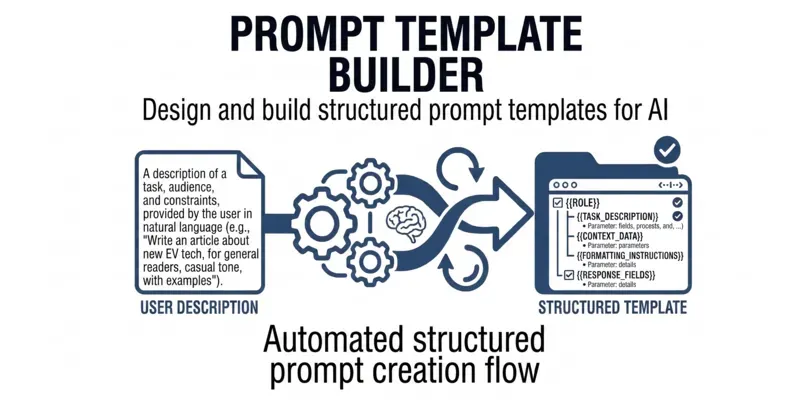
Builds and audits reusable prompt templates with typed variable slots, platform-safe conventions, and hallucination guardrails. Activate whenever a user wants to create a prompt template, fix an existing one, add variables to a prompt, audit a prompt for false confidence or hallucination risks, or produce a PromptBase-ready template. Use this skill even when the user just says "turn this into a template", "add placeholders", or "make this reusable".
...more
Added over 1 month ago

- Reviews for this skill (1)