

Skill Details
Runtime
(gpt-5.5)
Example user message
[userMessage]: We are a 12-person consulting team. We use Microsoft 365 every day: Outlook, Teams, Word, Excel, PowerPoint, SharePoint. We also have a few people using ChatGPT individually. Main workflows: - Summarize client meetings - Draft proposals - Analyze spreadsheets - Prepare PowerPoint decks - Review long client documents - Avoid leaking confidential client data Which AI tool should we standardize on?
Example agent response
Recommendation
Standardize on Microsoft 365 Copilot as your default team AI tool.
For your 12-person consulting team, it best matches your daily environment: Outlook, Teams, Word, Excel, PowerPoint and SharePoint. Copilot is built into those apps and works across documents, presentations, emails, meetings and data inside Microsoft 365.
Why Copilot fits your workflows
Workflow Best fit Why
Summarize client meetings Copilot / Teams Native meeting summaries, action items, follow-ups inside Teams.
Draft proposals Copilot / Word + Outlook Drafts from existing client docs, emails and templates.
Analyze spreadsheets Copilot / Excel Works where your spreadsheets already live.
Prepare PowerPoint decks Copilot / PowerPoint Better for first-pass deck creation from Word/client material.
Review long client documents Copilot first Uses SharePoint/OneDrive permissions and Microsoft Graph context.
Avoid confidential data leakage Copilot Stronger fit because it stays inside your Microsoft 365 governance model.
Microsoft states that Microsoft 365 Copilot uses Microsoft Graph data such as documents, emails, meetings, chats and contacts, but only surfaces organizational data the user already has permission to view. It also says prompts, responses and Microsoft Graph data are not used to train foundation models.
What to do with ChatGPT
Do not let people keep using individual ChatGPT accounts for confidential client work.
OpenAI’s own guidance says individual ChatGPT services may use content to train models unless the user opts out. Business products are different: ChatGPT Business and Enterprise do not train on business inputs/outputs by default.
So your policy should be:
Allowed
Microsoft 365 Copilot for client work.
ChatGPT Business/Enterprise only if the company buys and manages it centrally.
Not allowed
Free/Plus personal ChatGPT accounts for confidential client data.
Copy-pasting full client contracts, spreadsheets, financials or proposals into unmanaged AI tools.
Practical rollout
Start with Microsoft 365 Copilot for all 12 users, then run a 30-day pilot with three usage rules:
Client data stays in Microsoft 365
Use Copilot inside Teams, Word, Excel, PowerPoint, Outlook and SharePoint.
Fix SharePoint permissions first
Copilot respects existing permissions, so messy SharePoint access becomes a real risk. Clean folders, client workspaces, external sharing and sensitivity labels before broad rollout.
Use human review for every client deliverable
AI can draft proposals, summarize meetings and prepare decks, but a consultant must validate facts, numbers, tone and commitments before anything leaves the firm.
Final choice
Standardize on Microsoft 365 Copilot.
Add ChatGPT Business later only as a controlled secondary tool for tasks where Copilot is weaker, such as deeper reasoning, reusable prompt workflows, research synthesis, or advanced writing support. But for your current stack, workflows and confidentiality requirement, Copilot should be the main standard.

 Instant access
 Commercial use
By downloading this skill, you agree to our terms of service
5.0
1 review
10
Downloads
3
Favorites
48
Views
GPT-5.5


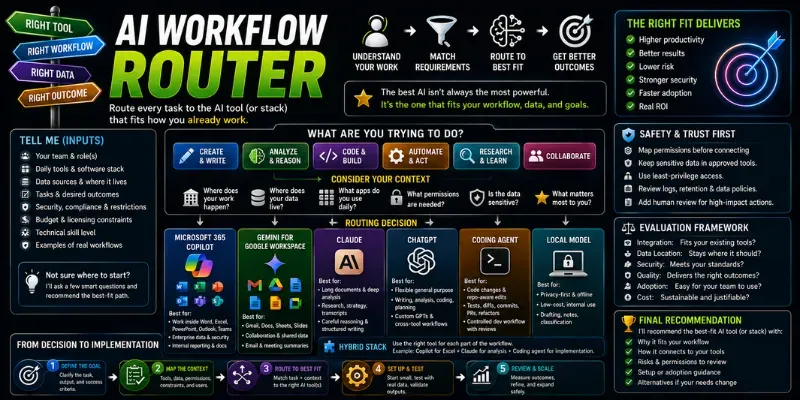
Choose the right AI tool for a real workflow instead of chasing generic benchmarks. Maps tasks, data, apps, permissions, team constraints, security needs, and output goals to the best-fit AI stack: Copilot, Gemini, Claude, ChatGPT, local models, or a hybrid setup.
...more
Added over 1 month ago

- Reviews for this skill (1)